





Design Your Own UV DTF Sheet, Right in the Browser
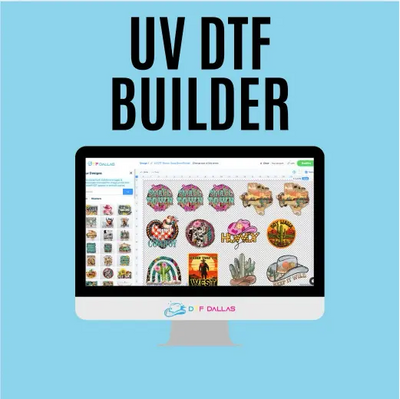
The UV DTF Gang Sheet Builder is a free online tool that turns your images into a print-ready sheet without any design software. Click Build Your Gang Sheet, drop in your artwork, and arrange it across a 22 inch wide canvas in lengths of 10, 20, 30, 60 or 80 inches, starting at $20. DTF Dallas prints the result as peel and stick decals for glass, metal, ceramic, acrylic and other smooth hard surfaces, applied with pressure alone.
Everything you create in this builder becomes a hard-surface sticker, so no heat is ever involved. If shirts or hoodies are the goal, the DTF gang sheet builder for apparel and standard DTF transfers are the right tools.
Let the Builder Arrange, or Take the Wheel
When you launch the builder you pick a mode. Both end in the same place: a filled sheet, priced by length, printed in Richardson.
Automatic Mode
Upload your designs and the builder packs them onto the sheet for you, arranging everything for maximum space and print efficiency. Ideal when you have a batch of decals and just want the tightest fit with zero fiddling.
Manual Mode
Drag every design where you want it, resize pieces on the canvas and arrange the sheet exactly how you picture it. The choice for makers who plan their layouts around specific cups, jars and product lines.
Five Clicks From Idea to Print Queue
The whole flow lives on this page. No emails back and forth, no waiting on a proof.
Launch the Builder
Hit the Build Your Gang Sheet button above to open the tool in your browser.
Pick a Mode
Automatic packs the sheet for you, Manual hands you the canvas.
Add Your Images
Bring in transparent PNGs at 300 DPI, one design or a whole season's worth.
Fill the Canvas
Arrange and size each piece until the sheet earns its length.
Pick Length, Pay
Choose 22x10 up to 22x80, add to cart and check out before 2:00 PM CST for same-day.
First time in the builder? The team recorded a full screen walkthrough: watch how to use the UV DTF Gang Sheet Builder .
A Well-Packed Sheet Pays for Itself
You pay for the length of the sheet, not the number of designs on it. That one fact should drive every layout decision you make in the builder.
Do This
- Mix products on one sheet: cup wraps, jar labels and keychain decals can all ride together
- Slot small decals into the gaps that big wraps leave behind
- Size each design in the builder to the product it will land on, before checkout instead of after
- Batch a season at once: one 22x80 filled well beats four half-empty short sheets
Avoid This
- Leaving large empty stretches of film you already paid for
- Crowding designs edge to edge with no breathing room, which makes cutting decals apart a chore
- Scaling artwork way up in the builder from a small source file, since the print keeps whatever blur you created
- Hairline strokes and floating specks that fight you during application, on any sheet, in any mode
What Comes Back From Richardson
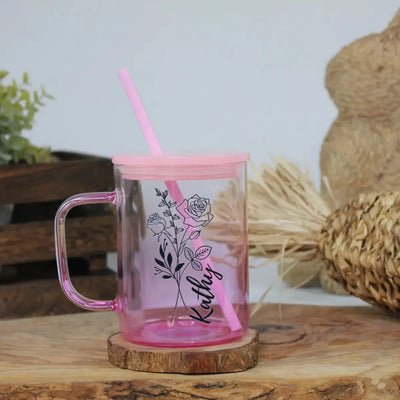
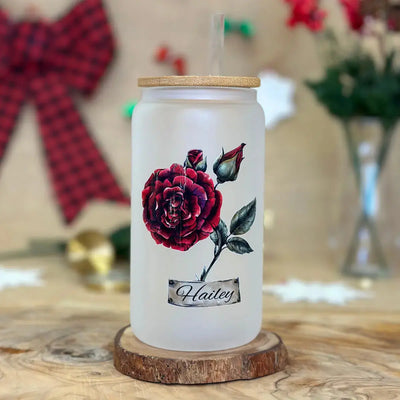
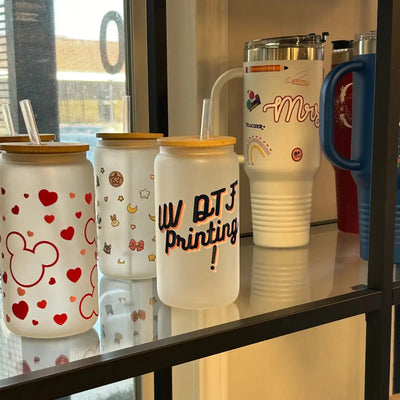
Your on-screen canvas returns as a printed film sheet full of ready-to-peel decals.


Where They Stick and How They Go On
Two things every builder user should know before checkout: the surfaces these decals love, and the sixty seconds of technique that applies them.
Friendly Surfaces
Everything you build here is destined for smooth, hard, clean material: glass drinkware, ceramic mugs, stainless bottles, acrylic blanks, jars, mirrors, toolboxes and sealed slick wood. Steer clear of textiles, silicone, bare or rough wood, deeply textured coatings and greasy plastics. An unfamiliar finish deserves one sacrificial decal before you commit a whole sheet to it, and fabric of any kind goes to standard DTF transfers instead.
Sixty-Second Application
- Cut a decal from your sheet and rub it down on its backing a few times with a squeegee
- Separate the clear carrier from the white backing slowly, taking the design with it
- Set it on a cleaned, dried surface and burnish firmly from the middle out
- Draw the clear film away at a low angle, re-pressing any corner that argues
Pressure is the entire recipe. No press, no iron, nothing hot, ever.
Builder, Upload or By Size?
Three doors into the same Richardson print room. Enter through the one that matches where your artwork stands today.
UV DTF Gang Sheet Builder
Your designs exist, your layout does not. Build the sheet in the browser, in Automatic or Manual mode, with nothing to install.
Start BuildingUpload a Finished Sheet
Your layout is already done in Canva, Photoshop or Illustrator. Skip the builder and send the finished file straight to print.
Upload Your SheetStickers by Size
You need one design in a set dimension, from a keychain decal to a full cup wrap, with no sheet involved at all.
Order by SizeBuilt Online, Printed in Richardson the Same Day
Sheets created in the builder before 2:00 PM CST join the same-day queue at DTF Dallas in Richardson, TX. Ship it anywhere in the country or swing by whenever suits you, day or night.
Same-Day Dispatch
Builder orders in by 2:00 PM CST print and ship today. UPS Ground rides free past $100.
Pickup Around the Clock
Grab your sheets 24/7 at 801 Alpha Dr, Ste 112, Richardson, TX 75081.
Stuck in the Builder?
The team walks customers through it daily: +1 (469) 769-8949 or send a message.
Builder Questions, Answered
The things customers ask before their first build, answered without the runaround.
What is the UV DTF Gang Sheet Builder?
The UV DTF Gang Sheet Builder is the free in-browser design tool from DTF Dallas that lets you compose your own sticker sheet without owning Photoshop or Illustrator. You upload images, place them across a 22 inch wide canvas in Automatic or Manual mode, pick a length between 10 and 80 inches, and the finished sheet prints in Richardson, TX. Hit Build Your Gang Sheet above to open it.
What is the difference between Automatic and Manual mode?
Automatic mode is the fast lane: the DTF Dallas builder arranges your uploaded designs for maximum space and print efficiency without you touching the layout. Manual mode hands over full control, letting you drag, resize and position every design exactly where you want it on the sheet.
Do I need design software or design skills?
No. The builder is designed to let you create a layout directly in your browser. You bring finished images, the builder handles the layout, and the step-by-step video walkthrough covers the process for first-time users.
What image files work in the builder?
Use transparent PNG files saved at 300 DPI and sized close to how large each design will print. Sharp, bold artwork with solid outlines generally transfers better than hairline strokes and scattered tiny elements, especially if artwork is enlarged significantly in the builder.
Can I put different designs and sizes on one sheet?
Yes. One UV DTF sheet can hold cup wraps, jar labels, keychain decals and logo stickers in different sizes side by side. Since the sheet is priced by length rather than design count, filling unused spaces with smaller designs can improve your cost per decal.
What sheet sizes does the builder offer?
Every builder sheet is 22 inches wide, with lengths of 10, 20, 30, 60 or 80 inches. Pricing starts at $20 for the 22x10 option. Pick a length that matches the amount of artwork you actually need to print.
Will I need a heat press for the finished stickers?
No. UV DTF decals are pressure applied to smooth hard surfaces. Cut the decal from the sheet, press it firmly onto the prepared surface and remove the clear carrier. Fabric projects belong with standard DTF transfers instead.
When should I upload a finished sheet instead of using the builder?
Use the builder when your layout does not exist yet. Use the gang sheet upload product when your layout is already arranged in Canva, Photoshop or Illustrator. For individual decals in preset dimensions, stickers by size skips gang sheets entirely.
How fast will my builder sheet ship?
Complete your DTF Dallas builder order before 2:00 PM CST and print-ready sheets are produced the same day in Richardson, TX. Free UPS Ground applies to qualifying orders over $100, and 24/7 local pickup is available at 903 N Bowser Rd Suite 250, Richardson, TX 75081.
Your designs are ready, the canvas is waiting. Open the builder, pack a sheet in Automatic or Manual mode, and check out by 2:00 PM CST to have it printed today in Richardson. Grab blank drinkware while you are at it, or call +1 (469) 769-8949 if you need help with the builder.