
Layering DTF Transfers: When You Can (and Definitely Can't)
Jul 3, 2026 (Updated on Oct 8, 2026)
Layering comes up in two contexts with DTF: layering a DTF transfer on top of another DTF transfer already applied to a garment, and layering multiple transfers adjacent to each other in a single press session.
These are very different situations with very different outcomes. Here is the honest breakdown of what works and what causes failures.
Quick answer
You cannot reliably press a standard DTF transfer on top of another cured DTF transfer. The adhesive bonds to fabric fibers, not to a cured DTF surface, so the top layer lifts or peels after the first wash. You can press multiple transfers side by side (adjacent) on the same garment with no problem, as long as the designs do not overlap.
In this article
- Why DTF-on-DTF layering fails
- What actually happens when you try
- Adjacent layering that works reliably
- Sequential pressing on the same garment
- Layering DTF over embroidery, screen print, HTV, rhinestones
- The one exception: specialty adhesive films
- How to design layered-look artwork the right way
- FAQ
Why DTF-on-DTF Layering Fails
The short answer: DTF adhesive is designed to bond to fabric fibers, not to a cured DTF surface.
When a DTF transfer is pressed and cured, the hot-melt adhesive layer fuses with the fabric and forms a polyurethane-based film on the surface. That cured surface is smooth and chemically similar to the carrier film the transfer came on.
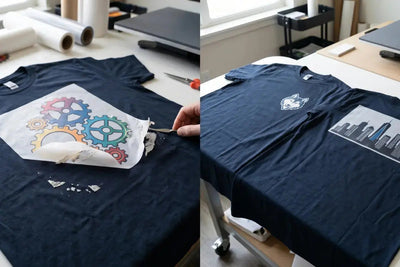
Pressing a second DTF transfer on top of a cured DTF surface gives the adhesive nowhere to anchor. The second transfer may appear to stick immediately after pressing, but it will lift, peel, or delaminate completely after the first wash.
This is not a temperature or pressure problem. Standard DTF adhesive does not reliably bond to a cured DTF surface, and adjusting press settings does not resolve the underlying compatibility issue.
What Actually Happens When You Try
The failure mode varies by attempt:
Hot peel attempt
The second transfer peels away with the carrier film when you try to remove the film. The adhesive did not bond. The design comes off with the peel.
Cold peel attempt
The second transfer may appear to have bonded after cooling. It typically lifts at the edges within the first wash cycle. The center may hold longer than the edges, creating a partially applied look.
High-pressure attempt
Increasing pressure on the second application can temporarily compress the adhesive into the first layer, but the bond is to the surface of the first transfer, not to fabric fibers. It fails the same way.
Adjacent Layering: What Works
Adjacent layering, pressing two transfers side by side on the garment surface without overlapping, is standard and works reliably.
Two transfers on the same garment, pressed either simultaneously or sequentially, with edges touching or very slightly overlapping at the film edge (not the design edge), produce no adhesion problems.
The key distinction is the design edge versus the film edge. A transfer has a printed design area and a surrounding film border. If two transfers are positioned so their film borders overlap slightly, the adhesive from the second press can bond to the exposed film border of the first, which can cause a visible edge line or slight lifting at the overlap. Keep film borders from overlapping. Position the design edges close together but keep the film borders separated.
Sequential Pressing on the Same Garment
Pressing two separate DTF designs on the same garment in sequence (press, remove, reposition, second press) is a normal multi-placement workflow. Nothing about the first pressed design prevents correct adhesion of the second, as long as the designs do not overlap.
Common sequential press applications:
- Front chest logo + back full panel
- Left chest logo + sleeve design
- Front graphic + collar/neckline tag replacement
- Multiple name/number placements on jerseys
For jersey team orders where names and numbers go on the same garment, sequential pressing is the standard workflow. The DTF Transfer Placement Guide covers the placement sequence and registration approach for multi-element jersey decoration.
Let it cool first. For sequential pressing, let the first application cool before handling the garment to reposition. Hot repositioning risks distorting the first applied transfer.
Layering DTF Over Other Decoration Methods
The same rule applies to most other decoration methods: DTF adhesive needs fabric fibers to anchor. Here is how each combination behaves when overlapped.
| Combination | Overlap? | Why |
|---|---|---|
| DTF over cured DTF | No | Adhesive cannot anchor to a smooth cured DTF surface |
| DTF over embroidery | No | Raised thread creates uneven contact; adhesive bridges across texture, leaving gaps |
| DTF over cured screen print | No | Cured plastisol or water-based ink is smooth and chemically incompatible with DTF anchoring |
| DTF over rhinestone / HTV | No | Dimensional rhinestones or PU film cause the same bridging and adhesion failure as DTF-on-DTF |
| DTF adjacent to any of the above | Yes | No overlap means no adhesion conflict between methods |
DTF over embroidery
Do not press a DTF transfer over an embroidery design. The raised embroidery surface creates uneven contact and the adhesive bridges across the thread texture. The result is partial adhesion with visible gaps.
DTF over screen print (cured)
Generally not recommended. Cured plastisol or water-based screen print creates a surface similar to cured DTF, smooth and chemically incompatible with DTF adhesive anchoring. Adhesion is unreliable.
DTF over rhinestone or heat transfer vinyl
Do not overlap. The dimensional surface of rhinestones or the PU film of HTV creates the same bridging and adhesion problem as DTF-on-DTF.
DTF adjacent to any of the above
Fine. Keep designs from overlapping and there are no adhesion conflicts between decoration methods.
The One Exception: Specialty Adhesive Films
Some DTF film manufacturers produce specialty overlaminate or adhesive transfer films designed to bond to cured DTF surfaces. These are not standard DTF transfers. They are a secondary product category.
If a customer needs a second layer or an overlay effect on top of an existing DTF print, a specialty film product is the tool for that application, not a standard DTF transfer.
The Right Way to Get a Layered Look
Most layering requests are really design requests. If the goal is a design that looks layered, the layering belongs in the artwork file, not in the pressing.
-
Build the layers into a single flat file
If a customer needs a design that appears to be two overlapping elements, like a shadow drop effect or a layered graphic, design it as a single flat file with the layering built into the artwork. DTF prints full-color designs in one pass. The layering exists in the file, not in the pressing.
-
Place new designs on undecorated fabric
If a customer is asking to add a DTF design to a garment that already has DTF decoration, the new design must be placed on an undecorated area of the fabric.
-
Do not try to cover or modify an existing print
If the customer wants to cover or modify an existing DTF design, DTF is not the right tool for that.
For designs that appear to have overlapping or layered elements, the artwork itself carries that visual: a single file with transparency and depth built in. Why and How to Convert Your Images to CMYK for Perfect DTF Transfers covers how transparent layers work in the file before the transfer is ever printed.
For the pressing workflow that applies to all single and multi-placement DTF applications, Step-by-Step: Applying DTF Transfers Ready to Press covers the technique decisions for each press in a multi-placement session.
Ordering Multi-Placement Transfers
DTF Dallas produces custom DTF transfers in any size and configuration for single or multi-placement garment decoration.
For multi-design orders, the gang sheet builder lets you arrange all placements for a single garment or a full team order on one sheet. Same-day production on print-ready files before 2:00 PM CT. Contact us with any placement questions before your order.
Frequently Asked Questions
Can you layer DTF transfers on top of each other?
No, not with standard DTF transfers. DTF adhesive bonds to fabric fibers, not to a cured DTF surface. A second transfer pressed on top of a cured DTF print may look bonded at first, but it will lift or peel after the first wash. The fix is to build the layered look into a single artwork file instead.
Can I press two DTF transfers side by side on the same shirt?
Yes. Adjacent placement works reliably as long as the designs do not overlap. Keep the film borders from overlapping, position the design edges close together, and both transfers bond correctly to the fabric. This is standard for front-and-back, chest-and-sleeve, and jersey name-and-number layouts.
Why does my top DTF layer peel off after washing?
Because it was pressed onto a cured DTF surface instead of fabric. The adhesive had nothing to anchor into, so it bonded only to the smooth film surface below. This is a compatibility issue, not a press-settings issue, so raising temperature or pressure will not fix it.
Can I press DTF over embroidery, screen print, HTV, or rhinestones?
Not overlapping. Embroidery has a raised texture that causes bridging and gaps. Cured screen print is a smooth, chemically incompatible surface like cured DTF. Rhinestones and HTV film cause the same adhesion failure. You can place DTF adjacent to any of these with no problem, as long as the designs do not overlap.
How do I get a layered or drop-shadow look with DTF?
Build the layering into the artwork as a single flat file. DTF prints full color in one pass, so shadows, overlaps, and depth effects should all live in the design file. The transfer prints them together and presses as one piece, which is both easier and more durable than trying to stack transfers.
Is there any film that can layer over cured DTF?
Some manufacturers make specialty overlaminate or adhesive transfer films designed to bond to cured DTF surfaces. These are a separate product category, not standard DTF transfers. If you need a genuine second layer or overlay effect on top of an existing print, that specialty film is the correct tool.
Need Multi-Placement DTF Transfers?
Custom sizes and configurations · Gang sheet builder for full garments and team orders · Same-day production before 2:00 PM CT
Order DTF transfers →
Comments 0
Be the first to leave a comment.