
DTF Logo Printing for Brand Tees: Color-Match Tolerance Explained
Jul 28, 2026 (Updated on Oct 8, 2026)
Brand-color accuracy is the single biggest concern for businesses ordering logo shirts through DTF. If your brand color is a specific shade of navy or a warm red with precise RGB values, you need to understand what DTF printing can and cannot do before you submit your first file.
The good news: DTF can hit brand colors with high consistency when you set up your file correctly and understand how color tolerance works in the process. The frustration: color-inaccurate results are almost always caused by file setup errors, not by DTF printing limitations.
Everything this guide covers
- Why color accuracy starts with your file
- The correct file prep workflow
- What color tolerance to expect
- How DTF Dallas handles brand color orders
- Consistent color across shirt colors
- How to evaluate your first print
- FAQ: DTF brand color answered
Quick answer: can DTF match my brand colors?
DTF matches most brand colors with high consistency when you convert your logo file to CMYK before submitting. DTF uses a five-color inkjet process (CMYK plus white), so navy, forest green, warm reds, gold and burgundy reproduce accurately, while neon, fluorescent and metallic colors fall outside the gamut. DTF is not Pantone-exact; for a guaranteed spot-color match, screen printing is the better method. DTF Dallas reviews logo files before printing and prints custom transfers with same-day production on qualifying orders.
Why Color Accuracy in DTF Starts with Your File
DTF printers use CMYK ink, which is a subtractive color model. Screens use RGB, which is an additive model. The two color spaces do not map to each other perfectly, which is why a bright cobalt blue on your monitor can print as a slightly muted navy, and a vivid electric green can shift toward olive.
On screen · RGB
R31 G111 B255
→
Printed · CMYK
C100 M75 Y0 K6
The gap between RGB and CMYK is widest for highly saturated, bright colors, especially electric greens, bright blues and neon tones. For most logo colors, particularly navy, forest green, warm reds, gold and burgundy tones, the CMYK equivalent is close enough that the difference is not visible at normal viewing distance.
The step most businesses skip: converting their design file to CMYK before submitting. For the most accurate and consistent color results, we recommend submitting your artwork in CMYK color mode. Files created in RGB may require color conversion during production, which can affect the appearance of specific brand colors.
The Correct File Prep Workflow for Brand Logo DTF
-
Open your logo in Photoshop or Illustrator
Start with the highest-quality version of your logo file you have, ideally a vector or high-resolution source.
-
Convert to a CMYK profile
If it is an RGB file, go to
Edit > Convert to Profileand select a CMYK profile.US Web Coated SWOP v2is the standard choice. -
Review the color preview
If any colors shift noticeably after conversion, adjust the CMYK values to better match your brand color intent before you go further.
-
Note your brand CMYK values
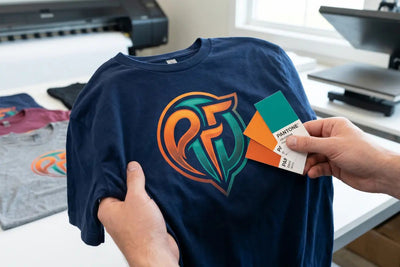
Record the exact CMYK values of your brand color. A standard Pantone 286 navy is approximately
C=100, M=75, Y=0, K=6. -
Save as PNG at 300 DPI
Export as a PNG at 300 DPI with a transparent background, then submit the CMYK PNG to your DTF supplier.
If your brand color is defined by a Pantone number, look up its CMYK equivalent in the Pantone color guide. The CMYK conversion will not be a perfect match to a Pantone-printed swatch, but it will be as close as inkjet-based DTF printing can produce.
Color modeCMYK
CMYK profileUS Web Coated SWOP v2
Resolution300 DPI
BackgroundTransparent
File formatPNG (flattened)
Pantone 286 navyC100 M75 Y0 K6
What Color Tolerance to Expect from DTF
DTF printing is not Pantone-exact. It is not offset printing. It is an inkjet-based process using a five-color ink set (CMYK plus white), which means the color gamut has limits.
Prints well
Warm and neutral colors
Reds, oranges, greens and blues in mid-saturation ranges reproduce accurately and consistently.
Prints well
Complex and photographic art
Multi-color artwork, gradients and photographic reproductions are a strength of DTF.
Prints well
Black, white and near-neutrals
Black, white and near-black or near-white shades hold cleanly on both light and dark garments.
Wide tolerance
Neon and fluorescent
Neon and fluorescent colors sit outside the CMYK gamut and print as the nearest in-gamut approximation.
Wide tolerance
Exact Pantone matching
Precise Pantone matching requires spot ink systems, which inkjet-based DTF does not use.
Wide tolerance
Substrate-dependent colors
Brand colors that depend on the specific garment shade for their visual effect vary more across substrates.
For most business logo shirts, DTF produces logo colors that match well enough to use in branded applications. For highly sensitive brand applications where a precise Pantone match on every print is required, screen printing with spot colors is the better method.
How DTF Dallas Handles Brand Color Orders
When you submit a logo file to DTF Dallas, the file goes through a pre-production review before printing. If you include color notes or target CMYK values with your order, the production team can verify the setup before pressing a full run.
For businesses ordering logo shirts regularly, submitting a CMYK-converted file with documented color values the first time creates a production baseline. Future orders using the same file reproduce the same color output, because the ink calibration and CMYK values stay consistent between runs.
DTF Dallas prints custom DTF transfers with same-day production on qualifying orders. For businesses ordering branded logo shirts in the DFW area, the Richardson shop at 801 Alpha Dr, Suite 112, is accessible for in-person file review before production if color accuracy is critical on a first-time order.
Practical Tips for Consistent Logo Color Across Shirt Colors
Getting the same logo color to look right on both a white tee and a black tee takes a few deliberate habits.
- Submit the same file for light and dark shirt orders. The white ink underbase on dark garments slightly affects how colors appear compared to light shirts, but the CMYK color values stay consistent. Test on both substrate colors before a large run to confirm the output.
- Avoid adding effects after the file is CMYK. Glows, overlays and transparency blend modes in Photoshop use RGB math by default and can reintroduce color shifts when the file is saved. Flatten and merge your layers before saving the final PNG.
- Do not use automatic ICC profile conversion without reviewing the result. Some conversion tools apply a different CMYK profile than expected, and the result can shift colors significantly. Always preview after conversion.
- Treat metallic and specialty colors as approximations. DTF cannot reproduce metallic, reflective or fluorescent ink effects. A metallic gold or silver logo prints as a flat CMYK approximation. For metallic accents, HTV or hot fix rhinestones are supplemental options.
How to Evaluate Your First Logo Print
When your first DTF logo shirt arrives, how you inspect it matters as much as the print itself.
First-print evaluation checklist
- Compare in daylight or daylight-balanced lighting, not warm incandescent light, which shifts all colors toward yellow and red.
- Compare the print to a physical brand reference, like a brand-approved sample garment or a printed color swatch.
- Do not judge against a screen. Screens are backlit and prints are not, so the two will always look different.
- If the color is off in a consistent direction, adjust the CMYK values before the next order.
- Document the adjustment so you can reuse it as a baseline going forward.
For the technical process of converting artwork files for DTF printing, the guide on why and how to convert images to CMYK for perfect DTF transfers covers the Photoshop workflow in full. For understanding what full-color artwork looks like across different garment colors, the guide to full-color DTF transfers covers color accuracy in broader terms.
Get it right on the first run. DTF Dallas reviews logo files before printing and prints custom transfers with same-day production on qualifying orders before 2:00 PM CT. For logo-sensitive orders, contact the shop before your first run to confirm your file setup and get a pre-production review.
Frequently Asked Questions
Can DTF printing match my exact brand color?
DTF matches most brand colors closely when you convert your file to CMYK before submitting, but it is not Pantone-exact, because it uses a five-color inkjet process rather than spot inks. Navy, forest green, warm reds, gold and burgundy reproduce accurately; neon and metallic colors do not. For a guaranteed spot-color match, screen printing is the better method. DTF Dallas reviews your file before printing. Build and preview your order to start.
Why did my logo print a different color than my screen?
Screens display RGB, an additive color model, while DTF prints in CMYK, a subtractive one, so saturated blues and greens can shift when printed. The fix is to convert your logo file to CMYK using a US Web Coated SWOP v2 profile and preview it before submitting. Submit a CMYK PNG at 300 DPI for the most predictable output.
What file format should I send for a brand logo?
Send a flattened PNG at 300 DPI with a transparent background, converted to CMYK using the US Web Coated SWOP v2 profile. Note your brand CMYK values and include them with the order so the DTF Dallas production team can verify the setup before a full run. A documented CMYK file also creates a baseline, so reorders reproduce the same color. Upload your file to begin.
Can DTF print metallic gold or silver logos?
DTF cannot reproduce metallic, reflective or fluorescent ink effects, so a metallic gold or silver logo prints as a flat CMYK approximation of that color. For genuine metallic accents, HTV or hot fix rhinestones are supplemental options that pair with a DTF print. Contact DTF Dallas to discuss combining methods on a logo order before your first run.
Will my logo look the same on light and dark shirts?
The CMYK color values stay consistent, but the white ink underbase on dark garments slightly affects how colors appear compared to light shirts. Submit the same file for both, and test on each substrate color before a large run to confirm the output. DTF Dallas prints the same file consistently between runs because the ink calibration stays fixed. Order a sample of each shirt color first, since there is no minimum.
When should I use screen printing instead of DTF for logos?
Choose screen printing with spot colors when a precise Pantone match on every print is required, such as strict corporate brand standards. Choose DTF when the logo has multiple colors, gradients or photographic detail, or when order quantities are small, because DTF has no per-color setup and no minimum. DTF Dallas prints full-color logo transfers with same-day production before 2:00 PM CT. Preview your logo order to compare.
Print Brand-Accurate Logo Shirts with DTF Dallas
Pre-production file review · Same-day production before 2 PM CT · No minimums
Build your logo order →DTF logo printing hits brand colors with high consistency when the file is prepared correctly. Convert to CMYK with a US Web Coated SWOP v2 profile, note your brand values, export a flattened 300 DPI transparent PNG, and evaluate the first print in daylight against a physical reference. For anything Pantone-critical, screen printing remains the spot-color option, but for most branded logo shirts, a properly prepared DTF file matches well enough to use everywhere your brand appears.
Comments 0
Be the first to leave a comment.