
Store unused DTF Transfers flat in a cool, dry indoor space away from direct sunlight and heat. Keep them in their original packaging when possible, and label each pack with the design, print width, placement, and date received. Before committing older stock to a customer order, test one representative piece on a spare garment that matches the production fabric.
A repeat shirt order shows why those details matter. The same logo can come in a 4-inch left-chest version and an 11-inch front version. Separate packages help you pull the right print and see exactly what you need to reorder.
Quick Answer
- Store: Use a clean, closable sleeve and a flat drawer or covered box. Give the film enough room to lie flat without bending.
- Organize: Keep each design, width, and batch identifiable. Record the package location and usable quantity so you can find and count stock before a job.
- Before pressing: Inspect older stock, test a representative piece, and subtract any pieces used for testing before calculating your reorder.
Set Up a Cool, Dry Storage Spot
Choose an indoor cabinet or drawer with steady conditions, away from sunny windows, heaters, damp floors, and the heat press. A wide, shallow drawer works well for cut pieces because it supports the film and lets you pull one sleeve without moving a heavy stack. Keep boxes and tools off the transfers so the film stays flat.
DTF Dallas recommends keeping unpressed transfers in their original packaging when possible. If the original sleeve tears or can no longer close, move the pieces to a clean, resealable sleeve large enough to hold them flat. Open it on a clean, dry workbench, take out the pieces you need, and close it before returning it to the drawer.
Store Cut Transfers Flat and Handle Long Gang Sheets
- Cut pieces: Lay the sleeves flat in a drawer, folder, or covered box. Use a container wide enough for the largest piece, including its clear film border.
- Full sheets that fit flat: Keep them supported across their length. For a job with several sheets, label the sleeves in order, such as "Sheet 1 of 3," so you can confirm you have the complete set.
- Long sheets that arrived rolled: If a sheet will not fit flat right away, leave it loosely supported in its original roll packaging for short-term storage. Keep the package from getting crushed. For longer storage, cut between the designs where there is room and lay the sections or individual pieces flat.
Cut and Sort a Gang Sheet
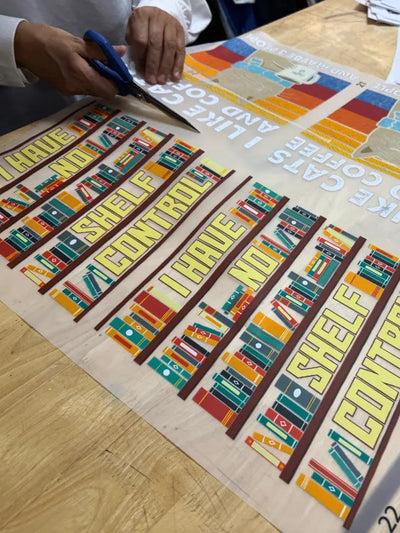
A gang sheet holds multiple printed designs on one carrier film. Set out the sleeves or trays for each job and placement before you pick up the scissors.
- Lay out the sheet. Use a clean, dry, flat work surface. If you use a rotary cutter, put a cutting mat underneath.
- Cut through the clear film. Use scissors or a rotary cutter and leave a small clear border around each design. When laying out a DTF Dallas gang sheet, leave about a quarter inch between designs so you have room to cut.
- Sort each piece as you cut. Put the 4-inch left-chest prints in one group and the 11-inch front prints in another. For multiple jobs, separate by job number first, then by design and placement.
- Set aside today's work. Arrange the pieces you'll press in job order. Count the extras and put them in their labeled sleeves before clearing the bench.
Label and Rotate Transfer Inventory
File active jobs by job number. For designs you print regularly, file by design and width so you can find the right piece even when there's no open job. Keep different artwork revisions and batches in separate sleeves so you can trace a piece back to its order.
For example, a sleeve label and its inventory entry could both read Team Logo V2 · 11 in. · Front · Received May 8 · Order 4172 · Drawer B2 · 12 on hand. Give the 4-inch left-chest version its own entry and sleeve. Save the approved artwork with the order details and print dimensions so you can find the correct file for a reorder.
Pull the oldest suitable batch first. Update the count when you use a piece, and mark any batch awaiting a test as on hold so it stays out of the usable count.
Inspect and Test Older Transfers
Properly stored DTF Transfers can remain pressable for months. Use the date and storage history to decide which batch to check first, then use its condition and a sample press to decide whether it's ready for a job.
- Check the package and film. Look for condensation, damp packaging, debris, scratches, creases through the design, or unusual glossy patches. Set aside visibly wet or damaged pieces and inspect the rest of the batch.
- Test one representative printed piece. Choose a spare garment with the same fabric and finish as the production shirts. Briefly pre-press the garment to remove moisture and wrinkles. Set the transfer printed side down on a flat area clear of raised seams.
- Use the settings for the transfer you're testing. For standard DTF Dallas fabric transfers on a manual heat press, press at 290 to 310°F for 8 to 15 seconds with firm, even medium to high pressure. Keep the garment flat and peel the carrier promptly while hot.
- Check the result. The carrier should release cleanly, the complete design should transfer, and the edges should stay bonded. If an edge lifts or part of the design stays on the film, stop before pressing the order. Check that seams and garment thickness aren't interfering with even platen contact.
If the problem persists, try a known-good transfer of the same type at the same placement on a matching spare garment, using the same settings. If it passes, keep the older batch on hold. If both pieces fail, check the press setup and fabric before running the order. If you still need help, email a photo of the result, the garment type, and your press settings using the address on Contact Us.
Count Usable Stock Before You Reorder
Suppose a repeat order calls for 12 shirts, each with an 11-inch front print positioned below a 4-inch left-chest logo. Check both placements on the actual shirt. You have 12 of each print, but use one front print to test the older batch. After the remaining pieces pass inspection and the sample presses cleanly, your count looks like this.
| Needed | Usable after testing | Order | |
|---|---|---|---|
| 11-inch front print | 12 | 11 | 1 |
| 4-inch left-chest logo | 12 | 12 | 0 |
Replace a Shortfall by Size
DTF Dallas lets you order a single transfer without a minimum quantity. For this job, pull the approved front-print file from the stock record, select the 11-inch width, and order one through DTF Transfers by Size.
Build or Upload a Mixed Gang Sheet
If your count shows shortages across several designs or widths, group the required pieces on one sheet. If you're starting with separate artwork files, place the front prints together and the left-chest prints together. Check widths, counts, and cutting space in the preview using the DTF Gang Sheet Builder.
If your layout is already print-ready, upload the completed file through DTF Transfer Gang Sheets.
FAQs
What if the sleeve has no date?
Check the original order record for the date and product details. If you can't recover the date, mark it as unknown, keep the sleeve separate from dated batches, and test a representative piece before assigning the stock to an order.
Can a silica gel packet help protect stored transfers?
An intact packet can help control moisture inside a sealed sleeve or container. Keep it away from the transfer surface and store the package in a dry room. If the film shows condensation or visible moisture, set the affected pieces aside for inspection.
Can I use a clear film offcut for a test press?
Use a printed piece from the batch you intend to run. A printed sample lets you check whether the design releases from the carrier and whether the edges adhere to the fabric. Set a spare aside when you count a batch you expect to test later.
For more on garment compatibility and gang sheet sizing, see the FAQs.
Order DTF Transfers by SizeComments 0
Be the first to leave a comment.