
Custom Koozies for Texas Weddings: Sizes, Counts, DTF
Nov 17, 2026
Custom koozies are one of the few wedding favors Texas guests put to use before the first dance. They keep drinks cold through a warm outdoor reception, carry your names and date home with every guest, and cost little enough to make one for everyone. This guide walks you through picking the right sleeve, counting how many you need, sizing your artwork, and testing a DTF transfer from DTF Dallas before you press the full batch.
Quick Answer
Start with your drink menu and how you'll hand out the favors. Match the sleeves to the cans or bottles your bar will serve. Then count one per guest if you're setting them at each seat, or stock the bar according to the drinks you expect to serve. If you're pressing your own wedding can coolers, make one with your actual artwork and blank sleeve before committing to the full batch.
Choose Sleeves That Fit Your Drinks
Ask your venue or bar team for the actual cans and bottles on the menu. A standard 12-ounce can and a slim 12-ounce can hold the same amount, but their shapes call for different sleeves.
| Sleeve | Fits | What to Test |
|---|---|---|
| Standard | Regular 12-ounce soda and beer cans | Slide it onto a can from the menu and check that it fits snugly. |
| Slim | Tall, narrow cans, including seltzers sold in that format | Check that the sleeve grips the can and sits evenly around the base. |
| Bottle | Bottles that match the sleeve's listed dimensions | Check the fit around the bottle body and make sure the zipper closes, if the sleeve has one. |
If the bar will serve both standard and slim cans, give the bartender one sample of each sleeve. You can use the same wedding design on both and label the baskets by can size.
Count Favors by How You'll Hand Them Out
If each guest gets a favor at their seat, start with your confirmed headcount. Add the keepsakes you want to set aside for yourselves and any spares you expect to use. If guests will pick up a sleeve at the bar, base your count on how many people you expect to choose canned or bottled drinks. Count welcome bags or rehearsal dinner favors separately when those guests will receive their own sleeves.
Suppose you have 100 confirmed guests and want one sleeve for each person. Your drink plan calls for 70 standard and 30 slim sleeves. You also want to keep four standard sleeves and two slim ones after the wedding. That gives you 74 standard sleeves and 32 slim sleeves, for 106 finished favors and keepsakes.
If you're pressing the design yourself, add a blank and a transfer for each size you need to test. In this example, testing both sizes would bring the starting order to 108 blanks and 108 transfers for a one-sided design.
Make the Design Readable at Actual Size
Lay the sleeve flat and measure the smooth area between the seams. Print your artwork on paper at its intended size and set it on the sleeve. Then slide the sleeve onto a can to see how the design looks in someone's hand. Try this on both sleeve sizes if you're using the same artwork across the order.
Give one element the most room. You could put your initials above a small date, or lead with a short phrase and place your names below it. If the date disappears at actual size, enlarge it or drop a decorative line to make space. Check the artwork against the color of the sleeve you'll use, especially if you're planning to print the same design on two different colors.
For a DTF Dallas order, prepare a transparent PNG at 300 DPI at the final print size and upload it in its normal reading direction. Once you've measured the sleeve, use DTF Transfers by Size to order a single transfer for your first proof.
Choose Finished Favors or Press Your Own
Order finished favors if you want the sleeves printed and ready to set out. Prepare the sleeve size, quantity, artwork, and print location for each version so you can review the proof against your order.
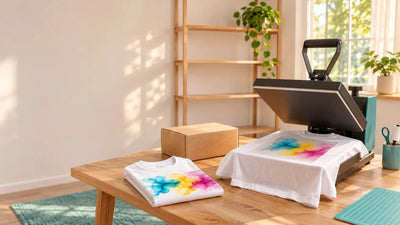
If you or someone helping with the wedding has a heat press, you can buy compatible blank sleeves separately and apply ready-to-press DTF Transfers yourself. Once you're happy with the proof, use the DTF Gang Sheet Builder to arrange repeated artwork or fit both design sizes onto a sheet. Cut the transfers apart and sort them by sleeve size before pressing. See the DTF Transfers & Gang Sheets FAQ for help with file preparation and layout.
Test One Sleeve Before Pressing the Batch
- Prepare the actual blank. Choose a sleeve the manufacturer specifies as suitable for heat application. Remove lint and lay the sleeve flat in the press.
- Check the placement. Center the artwork on the smooth part of the sleeve, away from seams and folded edges.
- Press one piece. Match the transfer's application settings to the blank's heat limits. If the blank's heat limit is below the transfer's application temperature, switch to a compatible sleeve before pressing.
- Check it on a drink. Once the sleeve has cooled, inspect the design edges, slide it onto the intended can, and check that the artwork reads clearly. Use the sample as your placement reference for the rest of the batch.
Work Back From Your Wedding Date
Use the day the venue needs the favors as your finish date. If you're making them yourself, schedule time to press the proof, apply the full batch, and pack the sleeves by size. If you're ordering finished favors, leave time to review the artwork proof and count the sleeves when they arrive.
DTF Dallas ships transfer orders nationwide and offers free local pickup in Dallas-Fort Worth. See the Shipping Policy for delivery options. For pickup, choose from the Pickup Locations at checkout and collect your order after the ready notification.
Set Out Favors Where Guests Will Use Them
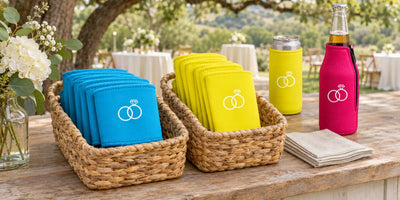
For an outdoor cocktail hour in the Texas Hill Country, put two labeled baskets by the bar so guests can grab the right sleeve as they order. If everyone gets their own favor, set it at their seat. If you want guests to take one on the way home, place a basket near the exit with a small sign inviting them to take one.
Frequently Asked Questions
How many koozies per guest?
Plan on one per guest if you're setting a favor at every seat. For a self-serve bar, use the expected number of guests who will choose canned or bottled drinks, then add any keepsakes you want to set aside.
Can DTF Transfers be pressed on foam or neoprene koozies?
Yes, both foam and neoprene sleeves can work when the blank is rated for the transfer's application settings. Test one of each sleeve you plan to use and check the print and fit once it cools.
Can I test one transfer first?
Yes. DTF Dallas has no minimum order for DTF Transfers. You can order one with your wedding artwork and press it onto the same sleeve you plan to use for the batch.
Do you review my file?
Yes. You can request a basic pre-order check for resolution, transparency, sizing, and print readiness. Email your artwork to info@dtfdallas.com with the final print dimensions, product type, quantity, and placement notes. See the file review instructions.
Can I print a different design on each side?
Yes. You could put your monogram on one side and the wedding date on the other. For separately applied DTF Transfers, count one print per side. A batch of 106 two-sided sleeves needs 212 transfers, plus any you set aside for proofs.
Should I put each guest's name on their sleeve?
Individual names work well when the sleeves double as place cards. For a shared basket at the bar, use one design for everyone so guests can pick the right size without searching for their name.
Once you've chosen your sleeve and measured the print area, start with one custom transfer and see how your wedding design looks on the real thing.
Order One TransferComments 0
Be the first to leave a comment.