
What Is Direct to Film (DTF) Printing? | Complete Guide for 2025
Jun 24, 2025 (Updated on Oct 16, 2026)
What Is Direct-to-Film Printing?
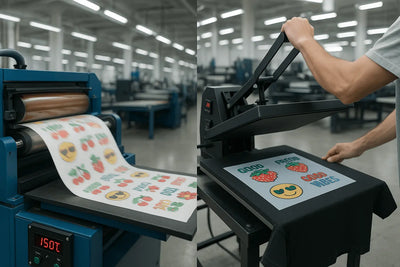
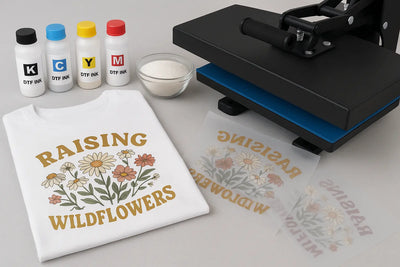
Direct-to-Film (DTF) printing creates designs on specialized carrier film for application to compatible garments with a heat press. A DTF printer produces the artwork using compatible inks, including the required white ink layer. Adhesive powder is applied to the wet print and heat-cured before the transfer is pressed onto clothing.
This guide distinguishes manufacturing transfers from applying purchased ready-to-press transfers. It also separates garment DTF from UV DTF, a different process for compatible hard surfaces.
Why Choose Ready-to-Press DTF?
- Full-color artwork: Combine logos, illustrations, and color variations without preparing a separate screen for each color.
- Flexible quantities: DTF Dallas offers custom transfers with no minimum order quantity.
- Less production equipment: Buying transfers avoids owning a DTF printer, RIP software, powder equipment, and curing system. You still need a suitable heat press.
- Gang-sheet planning: Arrange multiple designs or copies on one sheet, then separate them for garment application.
Actual cost, print feel, detail, and durability depend on the artwork, materials, garment, application, and care. Test small text and fine details at their intended print size.
The Materials Used in DTF Production
- Artwork: Prepare it at the intended print dimensions and follow the selected product’s file requirements.
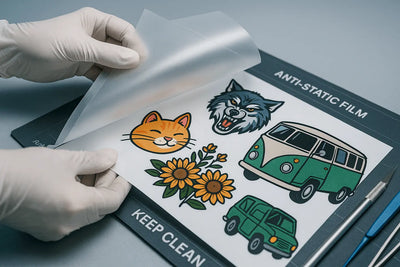
- DTF film: Use film compatible with the printing and adhesive system. Follow local disposal guidance; do not assume used printed film is accepted in recycling.
- DTF inks and RIP workflow: Use compatible color and white inks with the appropriate production settings.
- Adhesive powder: Apply a compatible powder to the wet print and remove excess powder.
- Curing equipment: Follow the powder, film, and equipment manufacturers’ instructions.
- Heat press: Apply the finished transfer to a compatible garment using the transfer’s application instructions.
Purchased ready-to-press transfers have already completed printing, powder application, and curing. Do not add extra adhesive or repeat film curing.
From Artwork to Finished Garment
- Prepare and print: Check artwork dimensions and prepare the print orientation and white layer in the compatible RIP workflow. Print onto the correct side of the film according to the system instructions.
- Powder: Apply adhesive powder while the print is wet, then remove excess powder.
- Cure: Heat-cure using the material and equipment instructions. There is no universal curing temperature, duration, or visual endpoint for every powder and film system. Garment pressing settings are not a film-curing recipe.
- Prepare the garment: Remove lint, lay it flat, and keep seams and fasteners away from the pressing area. If needed, pre-press for 3–5 seconds within the garment’s heat tolerance.
- Position: Place the printed adhesive side against the garment, with the clear carrier facing up. Check alignment and prevent shifting.
- Press and peel: Follow the application settings below for current standard DTF Dallas garment transfers. Keep the carrier attached until after pressing.
Current DTF Dallas Garment Application Settings
For current standard DTF Dallas garment transfers on a manual heat press:
- Temperature: 290–310°F (approximately 143–154°C).
- Time: 8–15 seconds.
- Pressure: Medium-to-high and even across the design.
- Peel: Hot peel the clear carrier promptly after pressing, keeping the garment flat.
- Finishing press: Optional; follow the current application guide if using one.
Do not wait for these transfers to cool before peeling. Follow the current application guide and the instructions supplied with your order, including protective material guidance. Pressure adjustments depend on the machine; do not assume a universal PSI setting. Other transfer systems or equipment may need different instructions.
Test the exact garment before a batch. Check adhesion, appearance, heat marks, and dye migration. Confirm compatibility before using nylon, leather, coated fabrics, or unfamiliar heat-sensitive materials. Let the finished garment cool before folding, and follow the garment label and Application and Care FAQ for washing and drying.
DTF, DTG, Sublimation, and Screen Printing
- DTF: Transfers a printed and cured design from film onto a compatible garment using heat and pressure.
- DTG: Prints directly onto garments and has its own fabric, pretreatment, and curing requirements.
- Sublimation: Uses suitable polyester materials or specially coated items; results depend on polyester content, color, and the item’s specifications.
- Screen printing: Uses screens to apply ink. Plastisol transfers are a separate transfer product, not another name for DTF.
Compare methods using your actual artwork, garments, quantity, finish requirements, labor, and total costs. No method automatically wins on softness, durability, or price for every job.
Where UV DTF Fits
UV DTF uses a different ink, film, and adhesive system for compatible hard surfaces such as glass, metal, glazed ceramic, and suitable plastics. Purchased UV DTF transfers are applied with pressure rather than a garment heat press. They are not a simple material swap within the garment DTF workflow.
Test the exact surface and finish. For wood, use only suitable smooth, sealed or coated surfaces after checking compatibility; raw or rough wood is unsuitable. Explore custom UV DTF options for hard-surface projects.
Frequently Asked Questions
How durable are garment DTF prints?
Durability depends on the transfer, garment, correct application, and washing and drying practices. Follow the care instructions. A specific wash-count claim requires a documented test with its conditions and results.
How should I size and arrange my designs?
Measure the intended placement on the actual garment and review the placement guide. On gang sheets, keep enough clear space to separate designs without cutting the artwork. Review the available sheet dimensions and product requirements before ordering.
Can I apply transfers at home?
Yes, with a suitable heat press, compatible garments, and the correct application instructions. Applying purchased transfers is different from manufacturing them, which requires a compatible DTF printing and curing system.
Can I guarantee an exact brand color?
Do not assume an exact match from screen artwork alone. Discuss color-critical projects before ordering and evaluate a physical sample when needed.
Order from DTF Dallas
Upload your prepared layout on the DTF gang sheets product page. Check current dimensions, artwork requirements, quantities, and pricing before checkout. Contact DTF Dallas if you need help selecting the right product.
Same-day shipping: Place print-ready DTF orders before 2:00 PM CT, Monday through Saturday. This is dispatch timing, separate from carrier delivery. See the Shipping Policy.
Daily same-day pickup: Choose Richardson, Carrollton, Argyle, Lucas, Mesquite, or Oak Cliff. Daily ordering cutoffs are 2:00 PM CT for Richardson and 5:00 AM CT for the other locations. Collection hours and access vary; check Pickup Locations and wait for your order-ready notification before visiting.
Comments 0
Be the first to leave a comment.