
DTF Transfer Temperature and Time: Perfect Heat-Press Settings for Every Fabric
Jun 10, 2025 (Updated on Oct 16, 2026)
Use these application settings for current standard DTF Dallas ready-to-press garment transfers on a manual heat press. They are not universal settings for every film, fabric, or machine. Follow the instructions included with your order and test the exact garment before a batch.
Standard DTF Dallas Transfer Settings
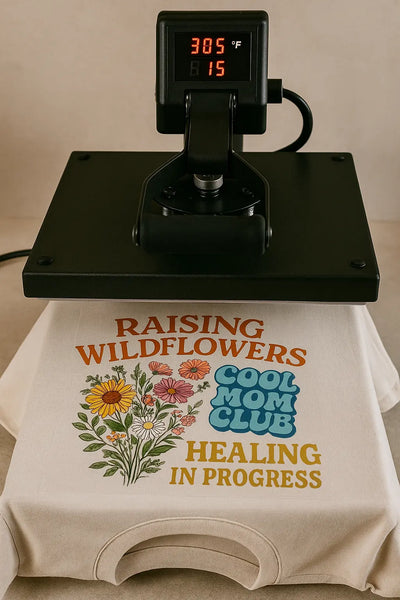
- Temperature: 290–310°F (approximately 143–154°C).
- Press time: 8–15 seconds.
- Pressure: Medium to high, distributed evenly across the design.
- Peel: Hot peel. Keep the garment flat and remove the carrier promptly after pressing in one smooth motion.
- Finishing press: Optional. Follow the current application guide for its timing and protective sheet.
Use our current heat press instructions and Application and Care FAQ as your main references. A fixed PSI reading or handle-closing force is not a universal pressure specification across machines. Hydraulic equipment may require different settings.
Fine-Tuning by Fabric
Cotton and Cotton Blends
Use the standard 290–310°F range, 8–15 seconds, medium-to-high even pressure, and hot peel. Remove lint and briefly pre-press as needed to remove moisture and wrinkles. Check the exact garment before a full run.
Polyester and Heat-Sensitive Blends
Test toward the low end of the approved 290–310°F range with the protective materials specified in the guide. Inspect for heat marks and dye migration. A lower setting does not guarantee that a particular polyester garment is suitable; check its care label and coatings.
Hoodies and Heavy Fleece
Start with the standard product instructions rather than automatically extending the press beyond 15 seconds. Seams, pockets, and thickness can prevent even platen contact. Position the garment carefully and use appropriate equipment accessories where needed.
Canvas and Fabric Bags
Check the actual fabric, finish, and heat tolerance. Some bags have coatings or linings that affect compatibility. Use the standard settings only on compatible materials and test first; do not treat all bags as the same substrate.
Nylon, Leather, and Specialty Surfaces
These require additional compatibility checks. Do not treat nylon as ordinary cotton or use a generic lower-temperature recipe. Contact info@dtfdallas.com before a production run on nylon, leather, coated, or unfamiliar materials.
UV DTF and Hard-Surface Wraps
UV DTF is a separate peel-and-stick product for compatible smooth hard surfaces. It does not use the garment heat-press process. Do not add a mug-press or heated curing step to a UV DTF wrap. Follow the instructions for the purchased product and see our UV DTF FAQ.
Troubleshooting Checklist
- Edges lifting: Check heat accuracy, even pressure, garment moisture, compatibility, and peel instructions. Consult the application guide before changing settings.
- Dull or changed colors: Check the artwork, garment, and application settings. Appearance alone does not prove that the temperature is too low.
- Scorching or shine: Stop and test the material. Do not assume extra heat, time, or a different cover sheet will make an incompatible garment suitable.
- Cracking after washing: Review application and care conditions, transfer condition, and fabric compatibility rather than assuming a single cause. Send photos and settings to support if needed.
Good Application Habits
- Choose a compatible blank and test the exact fabric and color.
- Remove lint and moisture as needed; keep the pressing area flat.
- Verify heat accuracy and pressure using the press manufacturer's recommended method.
- Hot peel current standard DTF Dallas garment transfers; do not wait for room temperature.
- Keep unused transfers protected from moisture, dust, excessive heat, and creasing, following the supplied storage instructions.
- Record settings and results so you can reproduce a successful application.
Test Before Your Next Batch
Order a small quantity of DTF transfers by size or upload a print-ready gang sheet to test your garment and press before increasing production.
For help, email info@dtfdallas.com with your order number, garment details, press type, settings, and photos.
Comments 0
Be the first to leave a comment.